Before
Fails PDF/UA-19 rules and 676 checks failed in veraPDF
Tag tree
No tags: a screen reader cannot tell a heading from a paragraph or a table.
Less legal risk, in 48 hours
We tag the PDFs you publish, validate them with veraPDF against PDF/UA-1, and a person reviews the alternative text, the tables and the reading order. For organisations bound by Spain's Law 11/2023 or Royal Decree 1112/2018, and for the agencies that prepare their documents.
 H1H2PH3Table
Fixing a PDF, from
€2
per page, excl. VAT. €3.50 if the page has tables or forms.
Fines per infringement, from €301 to
€1,000,000
depending on how serious the infringement is.
Companies that provide consumers with the services listed in Law 11/2023 (Art. 2.2): banking, electricity, water and gas supply, transport, electronic communications, e-commerce, e-books, travel agencies and social networks. Its Article 30 refers to each sector's penalty regime and, where that is silent, to the one in Royal Legislative Decree 1/2013 (Arts. 83 and 96): fines from €301 to €1,000,000. Microenterprises are exempt (Art. 3.3).
Public bodies must make their websites accessible, including downloadable documents, under Royal Decree 1112/2018 (Arts. 3.2 and 5). That decree sets no fines.
General information with links to the official texts in the BOE, Spain's Official Gazette. Not legal advice.
Tell us how many PDFs you publish and how many pages they have. The calculation runs in your browser and nothing is sent anywhere.
Example values: replace them with yours.
Fixing them costs
€920 excl. VAT
400 pages: 320 × €2.00 + 80 × €3.50
Not fixing them can cost up to
Minor infringement
€301 to €30,000
up to 33 times the cost of fixing
Serious infringement
€30,001 to €90,000
up to 98 times the cost of fixing
Very serious infringement
€90,001 to €1,000,000
up to 1,087 times the cost of fixing
Fines: Royal Legislative Decree 1/2013, Arts. 83 and 96, the regime Law 11/2023 refers to when the sector's own rules provide none. The authority decides in each case which regime and which degree apply. An estimate, not legal advice.
No platform to learn and nothing to install: a shared folder and, within 24–48 hours, your documents fixed.
You drop the PDFs into a shared folder (Google Drive, OneDrive or Dropbox).
We tag the structure, run OCR if the PDF is a scan, add the title and language, and validate with veraPDF.
A person checks the alternative text, the tables and the reading order, and fixes what the machine cannot.
The fixed PDF appears in your folder with a validation report: before and after.
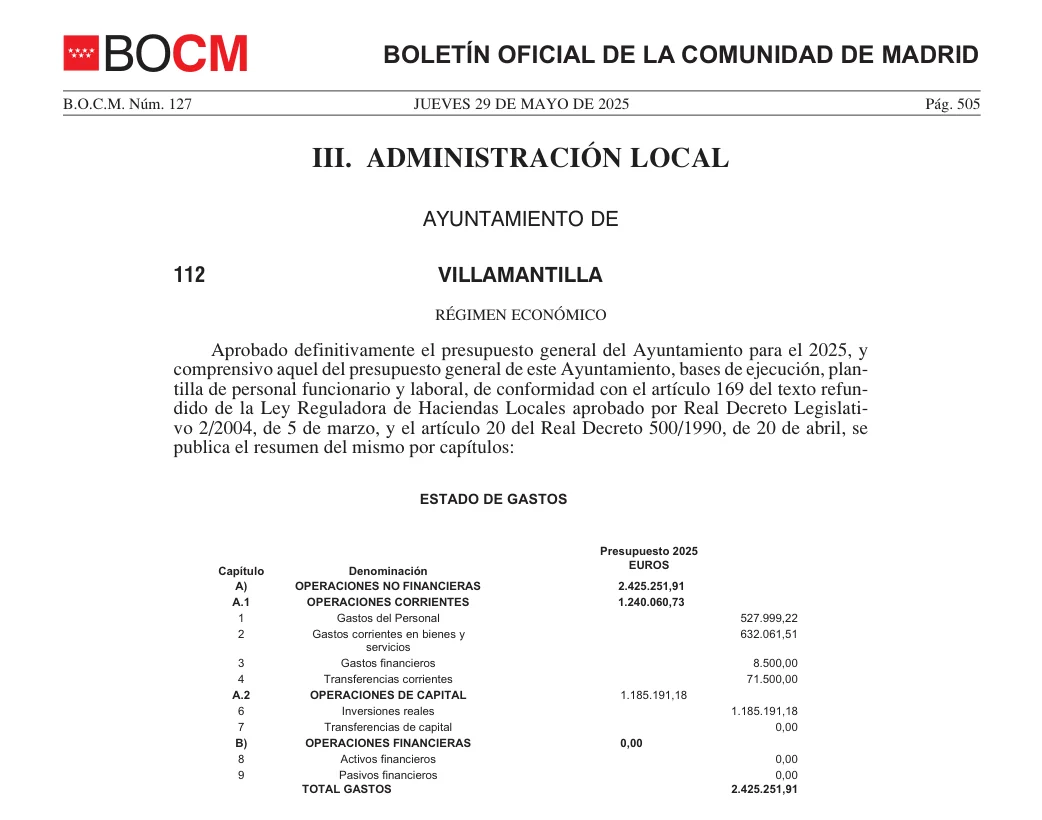
The 2025 general budget of Villamantilla Town Council, published in the Official Gazette of the Community of Madrid (BOCM no. 127, 29 May 2025): 2 pages and 5 tables. It is a public document, and we processed it like any job.
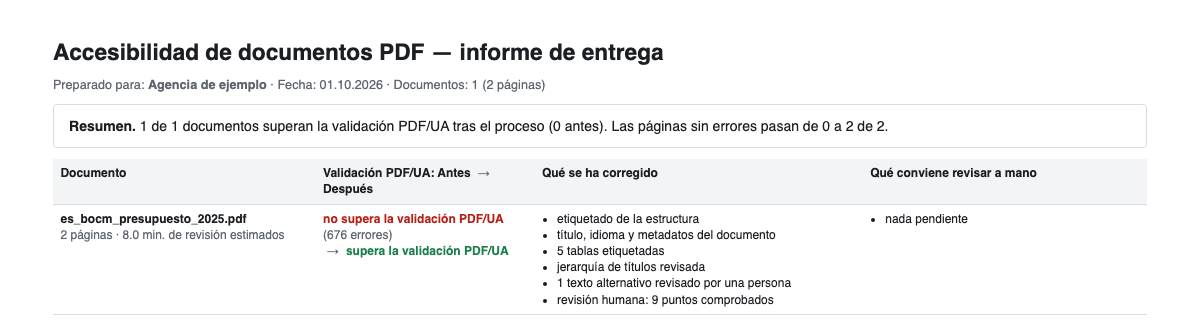
9 rules and 676 checks failed in veraPDF
Tag tree
No tags: a screen reader cannot tell a heading from a paragraph or a table.
0 failed rules in veraPDF
Excerpt of the tag tree
Pages without errors: from 0 to 2 of 2.
We work to public, verifiable standards. Every report says what was checked and with which tool.
It describes what each image or chart adds.
Row and column headers correctly assigned.
The order a person reading the page would follow.
A consistent hierarchy, with no skipped levels.
Your documents may contain personal data. This is what we guarantee:
Your documents are processed on systems with no internet access: tagging, OCR, AI and validation all run locally.
No external AI service receives your documents. Alternative-text suggestions come from an open-source model that runs on our own systems.
Each document is stored encrypted with its own key, and is decrypted only while it is being worked on.
30 days after delivery we destroy the key and the files: no copy that could be opened is left.
Reviewers see only fragments — a picture, a table's header — with personal data covered, and cannot download the document.
30 days
We keep the original and the fixed version, encrypted, for 30 days after delivery. Then we destroy their key and they are deleted automatically, including the cached tagging copy.
Before we process the first document, we sign a data processing agreement with you (Art. 28 GDPR).
By default, only us, on our own systems, and Google Workspace (Google Drive) for the shared folder. Any other external service only with a separately signed annex to the contract.
Transfers outside the EEA and your rights: privacy policy.
The full detail, six downloadable documents and how to check a delivered file: Security centre.
This site sets no cookies of its own and uses no analytics.
Before we start, we tell you how many pages of each type there are.
| Page type | Price excl. VAT |
|---|---|
| Standard pageText, images and charts | €2.00 |
| Complex pageWith tables or forms | €3.50 |
VAT not included. Prices for businesses, professionals and public bodies.
We fix what you have already published, make new documents accessible from the start and check what you publish.
Prices exclude VAT. An automatic check does not replace a person and is not a legal opinion.
If you design or lay out documents for public bodies and companies, PDF accessibility is usually left out of the job. You can offer it without building your own team.
You offer accessibility as part of your service; we work for you.
The validation report carries no name of ours, ready to hand to your client.
Each client has its own shared folder and deliveries, kept apart.
Try the process on real documents, at no cost.
To companies that provide consumers with the services in Law 11/2023 (Art. 2.2), except microenterprises, for documents published from 28 June 2025. And to public bodies, under Royal Decree 1112/2018, for documents published from 20 September 2018 or needed for active administrative processes. If you are unsure about your case, ask your legal adviser.
24 to 48 hours from when the document reaches the folder. For large volumes we agree a schedule before we start.
The report says which rules fail and what should be checked. If the problem lies in the source file, such as a badly built form, we explain it and suggest how to fix it.
No. We guarantee PDF/UA-1 validation with veraPDF and a review by a person for every document. Legal compliance also depends on the rest of your website and on how you publish your documents, and automatic validation does not replace testing with people who use screen readers.
ISO 14289-1, the standard for accessible PDF. It defines how headings, paragraphs, lists, tables and images are tagged so that a screen reader can understand them. A PDF can look perfect and still not be accessible.
Yes, but only on our own systems. An open-source vision model that runs on our own computer, offline, suggests descriptions of pictures and charts. No external AI service receives your documents, and no text is delivered until a person has reviewed it.
We run OCR to turn the image into text and then tag it like any other document. The quality of the scan affects the result, and the report says so.
We only use them to fix them, never to train artificial intelligence models. They are stored encrypted and 30 days after delivery we destroy the key and the files. Who processes them and where: privacy policy.
Not yet. What we do meanwhile: we process documents on systems with no internet access and no external AI services, with one encryption key per document and deletion after 30 days; reviewers see only fragments with personal data covered. Before the first document we sign a data processing agreement (Art. 28 GDPR) and, if you need to, you can audit our compliance with prior notice, as that agreement provides. More detail: Security and confidentiality.
In the Security centre: what each person on the team sees, encryption, who else processes the data, how long we keep documents, six downloadable documents (measures, incident response plan, sub-processors, record of processing activities, risk assessment and policy) and how to check with its SHA-256 fingerprint that a delivered file has not changed.
A service under €15,000 excl. VAT can be awarded as a minor contract (contrato menor, Public Sector Contracts Law 9/2017, Art. 118.1). Each body may have stricter internal rules.
Per page: €2.00 for a standard page and €3.50 for a page with tables or forms, excl. VAT. Before we start, we tell you how many pages of each type there are.
It is free and with no commitment, for public bodies, companies and agencies: we process 3 of your documents and return them with their before-and-after report. If they are not published yet, we sign the data processing agreement first.

DocClar was founded in Barcelona in 2026.
I am Dmytro Shelest. I work on one very specific thing: making the PDFs published on websites readable with a screen reader and able to pass PDF/UA validation. If you would like to talk before sending anything, write to me: I read and answer every message myself.
Write to us with one or two sample PDFs, whether you are a public body, a company or an agency. We reply with how many pages are standard and how many complex, and with a pilot proposal.
Email hola@docclar.com
The form and e-mail reach us directly, and we use them only to answer you.